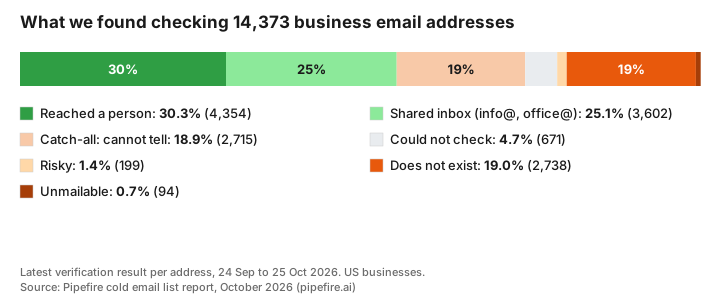
1 in 5 business email addresses on a typical cold email list does not exist. We verified 14,373 email addresses at US businesses between 24 September and 25 October 2026, and 19.7% were dead: the mailbox was gone, or the address could never receive mail. Only 55.4% could be confirmed as safe to email. For the other 24.9%, no check could say either way.
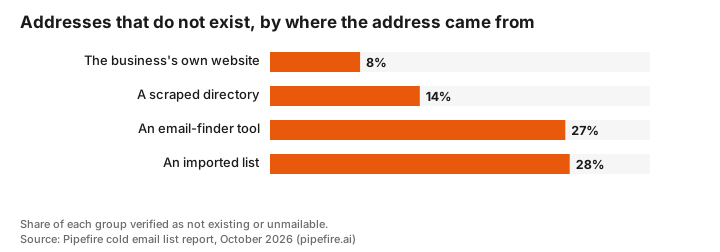
Where an address came from mattered more than anything else we measured. Addresses we found on the business's own website were dead 8.3% of the time. Addresses from imported lists were dead 27.6% of the time, more than three times as often.
These are not survey answers or figures from another vendor's report. They come from Pipefire's own prospect research and from the cold emails we sent to these businesses ourselves. You are free to use any figure or chart on this page. Please link to this page as the source.
Key statistics
- 19.7% of business email addresses do not exist or cannot receive mail (19.0% no such mailbox, 0.7% unmailable).
- 55.4% could be confirmed as safe to email: 30.3% reached a named person's mailbox and 25.1% a shared inbox such as info@ or office@.
- 24.9% could not be confirmed either way. 18.9% sit on catch-all servers that accept every address, so a check cannot tell real from fake.
- 8.3% of addresses found on the business's own website were dead, against 27.6% from imported lists and 27.2% from email-finder tools.
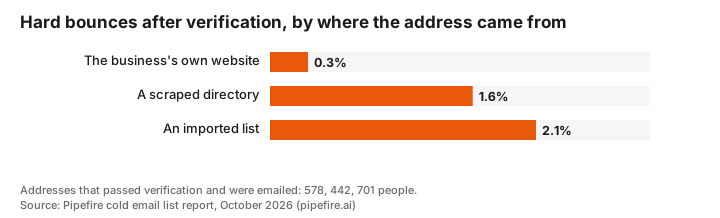
- 0.3% of website-sourced addresses that passed verification still hard bounced when we emailed them, against 2.1% from imported lists.
- 1.3% of the 1,782 verified addresses we emailed hard bounced. Another 0.6% were refused by the receiving server's policy, not because the address was dead.
- 27.0% of addresses with a named contact attached were dead, against 16.4% of addresses with no name. People leave jobs; info@ stays.
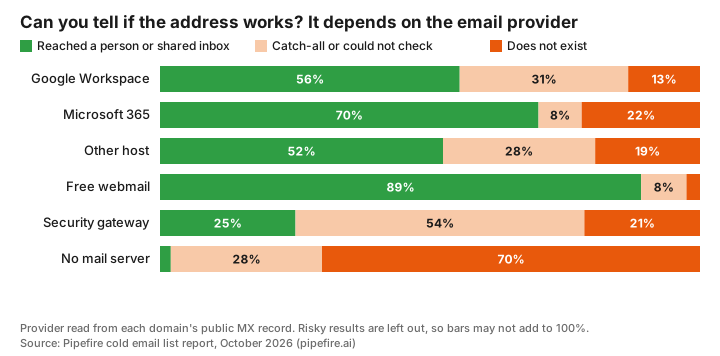
- 31.0% of addresses on Google Workspace were catch-all, against 5.9% on Microsoft 365. Google domains are much harder to check before you send.
- 7.0% of addresses were on domains with no mail server at all, and 70.0% of those were dead.
What did we find when we checked every address?
| Result | What it means | Addresses | Share |
|---|---|---|---|
| Reached a person | The server confirmed a named mailbox exists | 4,354 | 30.3% |
| Shared inbox | A real inbox shared by a team, such as info@ or office@ | 3,602 | 25.1% |
| Catch-all | The server accepts every address, so the check cannot tell | 2,715 | 18.9% |
| Does not exist | The server said there is no such mailbox | 2,738 | 19.0% |
| Could not check | The server timed out or refused to answer | 671 | 4.7% |
| Risky | A verifier flagged it as likely to bounce | 199 | 1.4% |
| Unmailable | The address is a system address, or the domain cannot receive mail | 94 | 0.7% |
A catch-all result is the one most people misread. The server says yes to every address, real or invented, then decides later whether to deliver it. A verification tool that marks catch-all addresses as "valid" is guessing. Nearly 1 in 5 addresses on our lists fell into this group.
Does it matter where the email address came from?
Yes, more than any other factor we measured. We record how every address was found. Addresses taken from a business's own website were the most reliable by a wide margin.
| Where the address came from | Addresses | Do not exist | Safe to email |
|---|---|---|---|
| The business's own website | 4,314 | 8.3% | 65.2% |
| A scraped business directory | 1,764 | 13.8% | 72.7% |
| An email-finder tool | 1,052 | 27.2% | 38.1% |
| An imported list | 6,981 | 27.6% | 47.5% |
A business publishes an address on its own website because it wants email there. A directory or list can be years old, and an email-finder tool often builds an address from a person's name and a domain pattern, then guesses. That is why a quarter of finder-tool addresses did not exist.
Do verified addresses still bounce?
Verification removes most dead addresses, but not all. We emailed 1,782 addresses that had passed verification. 24 of them, 1.3%, hard bounced anyway. Again, the source decided it.
| Where the address came from | Verified addresses emailed | Hard bounced | Bounce rate |
|---|---|---|---|
| The business's own website | 578 | 2 | 0.3% |
| A scraped business directory | 442 | 7 | 1.6% |
| An imported list | 701 | 15 | 2.1% |
This is our earliest finding and the one to treat with most care: it rests on 24 bounces. Even so, the gap is wider than chance would explain. At 95% confidence, the website figure is somewhere between 0.1% and 1.3%, and the imported-list figure between 1.3% and 3.5%. Most cold email tools ask senders to stay under 2% to 3%, so the difference decides whether a mailbox stays healthy. We left email-finder addresses out of this table: only 61 were emailed, too few to say anything.
A further 10 emails, 0.6%, were refused by the receiving server's policy. Those addresses probably exist; the server simply refused mail from a sender it did not know. Many tools count these as bounces, which makes a list look worse than it is and can mark real people as dead.
Are shared inboxes or named people more reliable?
Shared inboxes. It surprises people, because advice on cold email usually says to find a named decision maker.
| Type of address | Addresses | Do not exist | Hard bounced after verification |
|---|---|---|---|
| Shared inbox (info@, office@, hello@ and similar) | 6,156 | 15.8% | 0.7% (5 of 730) |
| A person's own address | 8,217 | 22.6% | 1.8% (19 of 1,052) |
The same pattern shows up in addresses that came with a contact name attached: 27.0% of those were dead, against 16.4% of addresses with no name. A named address lasts only as long as that person stays at the company. A shared inbox outlives every hire. That does not mean you should only email info@. It means a personal address needs a recent source and a fresh check before you send to it.
Does the email provider make a difference?
Yes, mainly to whether you can check the address at all. We read each domain's public mail server record to see who hosts its email.
| Email provider | Share of addresses | Safe to email | Catch-all | Do not exist |
|---|---|---|---|---|
| Google Workspace | 43.4% | 55.5% | 31.0% | 13.3% |
| Other web host | 18.9% | 52.4% | 12.5% | 19.4% |
| Microsoft 365 | 18.4% | 70.1% | 5.9% | 21.9% |
| No mail server | 7.0% | 2.0% | 0.8% | 70.0% |
| Free webmail (Gmail, Yahoo, Outlook.com) | 6.9% | 89.1% | 7.9% | 2.5% |
| Security gateway (Proofpoint, Mimecast and similar) | 3.4% | 25.1% | 35.4% | 21.4% |
Microsoft 365 answers verification checks clearly, so you know where you stand: 70.1% confirmed and 21.9% confirmed dead. Google Workspace domains were catch-all nearly a third of the time, so a large slice of any list aimed at small businesses cannot be confirmed before sending. Businesses behind a security gateway were the hardest of all: only 1 in 4 addresses could be confirmed.
7.0% of addresses were on a domain with no mail server. The business may have moved its email, let the domain lapse, or never set it up. Before checking any address, check that the domain has a mail server; our free MX lookup does it in a second.
Does it vary by industry?
A little. Marketing and advertising businesses had the most dead addresses. Legal and financial firms were the hardest to check.
| Industry | Addresses | Do not exist | Catch-all | Safe to email |
|---|---|---|---|---|
| Marketing and advertising | 7,952 | 22.3% | 15.8% | 56.1% |
| Web design and IT | 2,895 | 14.9% | 26.3% | 53.2% |
| Roofing and home services | 1,627 | 15.3% | 21.1% | 56.1% |
| Recruiting and consulting | 344 | 23.3% | 15.4% | 53.2% |
| Dental and medical | 244 | 16.0% | 19.3% | 58.6% |
| Legal and financial | 197 | 20.8% | 28.4% | 41.1% |
| Other | 1,114 | 19.4% | 17.9% | 56.9% |
Marketing agencies change staff and domains often, which may explain their dead-address rate. The smaller groups, under 400 addresses, can move by several points by chance, so read them as a rough guide.
What should you do before sending cold email?
Four habits remove most of the risk, and none costs much:
- Take addresses from the business's own website where you can. They were dead 8.3% of the time against 27.6% for imported lists, and bounced 0.3% of the time after verification.
- Check every address before the first email, and recheck old ones. Our free email verifier checks a single address. A list more than a few months old has had time to go stale, especially its named contacts.
- Treat catch-all as unknown, not valid. Send to catch-all addresses slowly, in small batches, and stop if bounces rise.
- Keep refusals and bounces apart. A policy refusal says the receiving server does not trust the sender yet. A bounce says the address is dead. Mixing them up hides a warm-up problem behind a list problem.
If you want a list built this way, you can get 50 free leads in your niche, each with the source of its email address.
Methodology
The addresses. 14,373 unique email addresses at 13,334 US business domains, from Pipefire's own prospect research between 24 September and 25 October 2026. They came from Google Maps business listings (4,778), LinkedIn company pages (3,576), a scraped business directory (2,521), the Clutch agency directory (1,790), web search (1,379) and the Houzz home services directory (215), across 1,514 US cities. For each address we recorded how it was found: on the business's own website, from a directory, from an email-finder tool, or from an imported list with no recorded origin.
The checks. Each address was verified by one of three methods: Reoon, BounceBan, or Pipefire's own check, which asks the business's mail server directly whether the mailbox exists without sending an email. Where an address was checked more than once, we used the latest result. We grouped the tools' labels into the plain categories in the first table. "Safe to email" means the server confirmed the mailbox, or it is a shared inbox that accepts mail. The email provider comes from each domain's public MX record, looked up through public DNS resolvers on 25 October 2026.
The sends. Pipefire emailed 1,782 of the verified addresses from its own warmed-up mailboxes as part of its normal outreach. A hard bounce is a permanent delivery failure saying the address does not exist (see bounce back messages). A policy refusal is a permanent failure with a 5.7.x status code, the class receiving servers use for security and policy reasons. Bounce figures cover verified addresses only, so they show what verification misses, not how bad an unchecked list is.
Limits. The sample is not a random sample of US businesses. It reflects who Pipefire researches, so marketing agencies make up more than half of it, and every business in it has a website. Verification tools can be wrong in both directions. The bounce figures by source rest on 24 hard bounces and should be read as an early finding. Figures are rounded to one decimal place. We will rerun the study as the sample grows and update this page.
For how small businesses protect their own domains from fake email, see our small business email security statistics. For published open and reply rate benchmarks, see cold email benchmarks.
Cold email statistics FAQ
What percentage of business email addresses are invalid?
19.7% of the 14,373 US business email addresses we checked did not exist or could not receive mail. Another 24.9% could not be confirmed either way, mostly because the server accepts every address. Only 55.4% could be confirmed as safe to email.
What is a good bounce rate for cold email?
Under 2% is the usual target, and many sending tools pause a campaign at 3%. In our own sending, verified addresses bounced 1.3% of the time overall: 0.3% for addresses from the business's own website and 2.1% for addresses from imported lists.
Why do verified email addresses still bounce?
Because verification is a snapshot. A mailbox can be deleted after the check, and catch-all servers say yes to every address and reject later. 1.3% of the verified addresses we emailed still hard bounced. Rechecking old addresses and preferring addresses the business publishes itself cut that risk the most.
What is a catch-all email address?
A catch-all domain accepts mail for any address, real or not, so a verification check cannot tell whether a particular mailbox exists. 18.9% of the addresses we checked were catch-all, rising to 31.0% on Google Workspace domains.
Are info@ addresses good for cold email?
They are more reliable than personal addresses. Shared inboxes such as info@ and office@ were dead 15.8% of the time against 22.6% for personal addresses, and bounced 0.7% of the time after verification against 1.8%. They often reach the owner of a small business directly.
Can I use these statistics?
Yes. Every figure and chart on this page is free to use. Please credit Pipefire and link to this page as the source.